 SEGLY
SEGLY
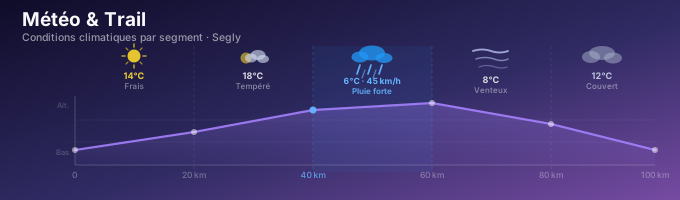
Weather is one of the most underestimated variables in trail running and ultra-trail running. A 45 km/h headwind on a ridge, heavy rain on technical terrain, or extreme heat at low altitudes can completely turn a race on its head. Yet the vast majority of GPX analysis tools completely ignore weather conditions—as if every course were run under blue skies, at 15°C, and with no wind. Segly is now taking this a step further: weather data is now integrated directly into the race analysis, segment by segment. You’ll know in advance which segment will be in the rain, where the wind might slow you down, and when it’ll be crucial to put on your jacket. This is information that top runners used to have to track manually—now it’s right there in your GPX analysis.
Why the Weather Changes Everything in Trail Running
Most race plans are built on an implicit assumption: conditions will be normal. But in a 24-hour or longer ultra, “normal” conditions are the exception. Weather isn’t a secondary factor—it’s a performance factor in its own right, and neglecting it is like preparing for a race in an ideal world that might not exist on race day.
Heat: The Enemy of Endurance
When the temperature exceeds 20°C, your body begins to divert some of its energy toward regulating body heat. Blood flow is redirected to the skin to promote heat dissipation—at the expense of the muscles. The result is immediate: a pace that felt comfortable at 14°C becomes difficult at 26°C. Research on the thermal impact of endurance running shows a 1–3% decline in performance for every additional degree above 15°C, with the rate of decline accelerating above 25°C. Over a 30-hour ultra, the cumulative effect is significant.
Headwinds: An Invisible Wall
A headwind of 40 km/h generates direct aerodynamic drag, resulting in approximately a 10–15% increase in perceived effort on an exposed stretch. Studies on aerodynamic drag in running quantify this impact precisely. On a ridge at an altitude of 2,000 m, this wind can blow in constant gusts for several kilometers in a row. If you don’t factor this into your race plan, the difference in split times can reach 10 to 15 minutes on a single segment—a gap that affects the rest of the race and can jeopardize your time goals.
Rain: The Accumulation of Invisible Wear and Tear
On soggy terrain, each stride requires greater muscular stabilization. Footstrike is less firm, and maintaining balance engages muscles not directly involved in propulsion. On a technical descent made muddy, speed can drop by 30 to 40 percent, and the energy expended to “hold” the terrain accumulates silently. After 4 hours of rain, your legs have done a considerable amount of extra work—even if the stopwatch doesn’t show it yet. The risk of falling also increases, which creates additional mental strain that takes a toll on your energy.
The Cold: An Often Underestimated Challenge
Below 5°C, the heart works harder to maintain body temperature. Energy gels can freeze in your pockets, making it difficult to refuel when it’s most critical. And the trap of the cold is that the sensation of thirst decreases drastically while dehydration progresses silently. Many runners arrive at aid stations with a significant fluid deficit without even realizing it.
Ignoring the weather in your race plan means building a strategy on false assumptions. And in an ultra, false assumptions always catch up with you—often starting at the 60 km mark, when it’s too late to make adjustments.
Weather by segment: data for every stage of your route
What’s new with Segly is that it doesn’t just display a general weather forecast for the entire race—it provides precise weather data for each segment of your route. This is a radically different approach from what’s been available so far in trail GPX analysis tools.
How does it work? As soon as you enter your start date in Segly—provided that date falls between today (D0) and the next 10 days (D+10)—the app automatically retrieves the weather forecast for each segment’s starting point. You don’t have to configure anything manually—the data appears directly in your analysis.
What’s displayed for each segment:
- Estimated temperature at the time of passage
- Wind direction and speed
- Precipitation (in mm/h)
- A clear, general description: “Cold,” “Foggy,” “Windy,” “Very hot,” “Heavy rain,” etc.
A concrete example: Imagine a route divided into 6 segments. Segment 3, scheduled for around 3 a.m., displays “Difficult · Heavy Rain · 12 mm/h · 6°C · Wind 45 km/h.” You now have precise information for this specific moment of your race. You can decide to slightly increase your pace for this segment, let your support team know to prepare a hot broth and a thermal layer for you, and mentally prepare yourself for a challenging stretch—without being caught off guard.
Important: The weather forecast is for informational purposes only. Segly does not automatically adjust anything in your analysis. You remain in control of your pace factor segment by segment—the weather data is there to inform you, not to make decisions for you.
What You Can Do with This Data
Having segment-by-segment weather data is good. Knowing what to do with it in practice is better. Here are the five ways this data transforms your race preparation.
Gear: Put on your jacket at the right aid station
With segment-by-segment weather data, you know exactly at which kilometer conditions will deteriorate. No need to carry your jacket for the first 40 kilometers “just in case”: you know it won’t be needed until segment 4, around kilometer 62. You optimize your weight and comfort, and you arrive at the aid station with a specific instruction for your support crew: “jacket + base layer + poles at this aid station.” On a long course, avoiding 400 grams of unnecessary weight in your pack over 40 km really makes a difference in your legs by the end of the race.
Hydration: Adjust Your Intake to the Weather Conditions
In extreme heat, the goal is to drink every 20 minutes even if you don’t feel thirsty—thirst is a late indicator of dehydration. Conversely, in strong winds or intense cold, dehydration is more insidious: you sweat without realizing it, and you don’t feel thirsty. Segment-by-segment weather forecasts let you adjust your fluid intake between each aid station based on the actual conditions you’ll encounter, rather than on an arbitrary average calculated for the entire race. Between two aid stations 15 km apart at 28°C, your needs are different than at 10°C with a tailwind.
Nutrition: The Right Foods at the Right Time
In cold weather, avoid liquid gels, which can freeze in your pockets. Opt for hot broths at aid stations, high-calorie energy bars, and salty foods to maintain electrolyte levels. In hot weather, foods that are too fatty slow down digestion—opt for fast-acting carbohydrates and fresh fruit instead. If a rainy stretch is expected to be particularly long, plan for more calories: the effort required to maintain stability on soggy terrain significantly increases energy expenditure compared to dry, firm ground.
Race Strategy: Plan Ahead Rather Than React
If Segment 5 is expected to bring severe weather deterioration, it might be better to arrive at the previous aid station a little early—to set off under the best possible conditions and avoid being caught off guard on the difficult segment. Conversely, if conditions are favorable on the first segments, you can choose to capitalize on this strong start by maintaining a slightly higher pace. The segment-by-segment weather forecast gives you the information you need to make these decisions in advance, with a clear head. To learn more about optimizing split times, the article on calculating split times in ultra-trails details how to combine all these variables into a realistic plan.
Support and Collaboration: Coordinating Your Team
One of the most practical—and often overlooked—uses is sharing your annotated race plan with your support team. Thanks to the segment-by-segment weather forecast, they now know what gear to pack, what supplies to bring to each aid station, and which segments will be challenging. This coordination can save several minutes at aid stations—and avoid unexpected issues that can mentally destabilize you when you least need it. A well-briefed support team is often the difference between finishing and dropping out of an ultra-long race.
Level-Based Estimation: Overall Weather Conditions for an Even More Accurate Prediction
Segment-by-segment weather isn’t the only new feature. The “Estimation by Level” mode also benefits from weather integration—but in a different and complementary way.
In this mode, Segly uses three parameters to estimate your overall race time: your running level, the technical difficulty of the terrain, and now the general weather conditions for the race. Segly retrieves the forecast weather conditions for the entire course and automatically classifies them into three categories: cool, moderate, or warm. This parameter is preselected—you don’t have to choose it yourself, which simplifies the experience for runners preparing for an upcoming race.
Each category has a real and measurable impact on overall performance. Cool conditions (10–15°C) are generally favorable for long-distance endurance. Moderate conditions (16–22°C) are neutral. Hot conditions (above 22°C) are detrimental, with performance decline accelerating depending on the intensity of the heat and the duration of exposure.
A concrete example: two runners of equal ability, on the same 100 km course. One starts at 28°C, the other at 14°C. The estimated difference in finishing time can exceed one hour on an ultra-long race—without one runner being “better” than the other. This reality, which until now was left to the runner’s intuition, is now factored into Segly’s calculation.
Tip: This mode is ideal for estimating your time on a new race or setting a realistic goal several weeks in advance. To avoid common mistakes when preparing for a mountain trail race, also check out the 5 mistakes to avoid when preparing for a mountain trail race.
Terms of Use for Weather Data in Segly
A few practical points to know before using this feature:
- Availability window: Segment-by-segment weather is only available if your start date falls between D0 (today) and D+10. Beyond that, weather models aren’t reliable at the route-segment level—Segly doesn’t display them to avoid providing you with incorrect information that could hinder your preparation.
- The same applies to the level-based estimate: the overall weather data used in this mode follows the same access rules and reliability limitations.
- You always remain in control: Segly displays weather information to help you make decisions, but you’re the one who confirms your settings. No settings are changed automatically without your approval.
Conclusion: more thorough preparation, better-planned races
The weather is no longer a variable you have to manage on your own, by cross-referencing your forecasts with your race plan on a corner of a table the day before the start. It is now integrated directly into Segly, at the level where it makes sense: the segment.
What this change means in practice is that you can prepare for a race under its actual conditions—not under ideal conditions that may never exist. And in trail running and ultra-trail running, preparing for real-world conditions is often the difference between finishing strong and struggling through the last 20 kilometers.
Upload your GPX file to segly.vo2run.app, enter your start date, and see what weather conditions await you segment by segment. Your next race deserves preparation that’s up to the task.