 SEGLY
SEGLY
Most runners calculate their split times in ultra-trail races using a simple formula: distance divided by average pace. The result? A plan that falls apart as soon as the first real climb begins. In an ultra, this approach isn’t just inaccurate—it can cost you a finish outside the time limit, hypoglycemia halfway through the race, or missing a support station at the wrong moment.
In this comprehensive guide, you’ll discover how to calculate your split times for trail races realistically: the four factors that really make a difference, a manual method that requires no tools, and how to automate the whole process to get reliable predictions down to the minute—just like at the Euskal Trail 130: target 20:59, result 20:57—a margin of error of just −2 minutes over a 21-hour race.
Why Traditional Methods Don’t Work for Ultra-Trails
There are two conventional approaches to estimating trail split times. Both fall short when it comes to ultras.
Naismith’s rule: useful but incomplete
Naismith’s rule estimates that it takes 1 hour per 5 km on flat terrain, plus 1 hour for every 600 m of elevation gain. This is a good starting point for hiking—but it doesn’t account for technical descents, altitude, accumulated fatigue after 12 hours of exertion, or the technical nature of the terrain. In ultra-trail running, it’s insufficient.
Average km/h: dangerous in the mountains
Even more common: “I run at 6 km/h, so my 100 km will take 16 hours and 40 minutes.” ” The problem? 6 km/h on flat ground at 400 m elevation has nothing to do with 6 km/h on a 15% climb at 2,200 m. The difficulty isn’t proportional to the distance.
Here’s an example with specific numbers:
- Segment A: 10 km, flat, elevation 800 m → pace 6 min/km → 1:00
- Segment B: 8 km, 600 m elevation gain, altitude 1,800 m → elevation gain coefficient −35%, altitude coefficient −8% → actual pace ~14 min/km → 1h52
Same distance (or nearly so), but the time is doubled. That’s why average km/h doesn’t work for calculating an ultra-trail race plan.
The 4 Factors That Really Impact Your Split Times
To develop a realistic trail running strategy, four parameters are essential. Ignoring them means you’ll be forced to improvise during the race.
1. Positive and negative elevation gain
The impact of elevation gain is intuitive: climbing costs energy and slows you down. But elevation loss is often underestimated. A steep 10-km descent after 15 hours of racing wrecks your quadriceps. In the final hours of an ultra, descents can be just as taxing as ascents—and must be factored into your plan.
2. Grade
Two segments with the same elevation gain are not run the same way. A 12% climb can be jogged, while a 25% climb requires walking to conserve energy. An 8% descent is fast and smooth, while an 18% descent on technical terrain demands caution. The pace for mountain trail running depends on the specific gradient, not just the total elevation gain.
3. Altitude
Above 1,500 m, the reduced oxygen levels take a toll on performance: approximately 3 to 5% less aerobic capacity for every additional 500 m. On an ultra with mountain passes at 2,500 m, the cumulative effect is significant—especially if you train at sea level. A segment at 2,400 m elevation with 800 m of elevation gain can take 18 to 22% longer than the same segment at 600 m.
4. The Fatigue Factor
This is the most underestimated factor in ultra-trail training. No one runs at the same pace at the 20-hour mark as they do at the 2-hour mark. The gradual decline in pace over time is inevitable—and predictable, if you factor it in when you create your training plan.
The fatigue factor: the key that no one factors in
In ultra-trail training, the fatigue factor is the great overlooked element. We talk about elevation gain, nutrition, and training—but rarely about the systematic decline in pace as the kilometers pile up. Yet it’s often this factor that determines whether you finish within the time limit or hit the wall in the second half.
Definition and simplified formula
The fatigue factor measures the difference in pace between the first and second halves of a race:
Real-world examples
- Kilian Jornet, UTMB 2022: fatigue factor of approximately +14%—he ran the second half 14% slower than the first. And that’s him.
- Experienced amateur runner: fatigue factor averaging +25 to 30%. Nearly a third slower in the second half.
- Too fast a start: fatigue factor of +40 to +50%—a sign of poor pacing that often ends in a DNF or a forced walk over the last 20 kilometers.
This statistic forces you to be honest with yourself: you won’t be able to maintain your starting pace all the way to the finish line. Planning otherwise is planning to burn out. This is precisely why most poor finishes in ultra races happen in the last 20 kilometers—not because the runner is undertrained, but because they paced the first half poorly.
The manual method: calculating split times segment by segment
If you want to calculate your trail split times without a digital tool, here’s the 5-step method. It’s useful to understand, even if—let’s be honest—doing it by hand for a 100 km race takes several hours—and is still prone to errors.
1. Break down the course
Identify natural dividing points: official aid stations, major mountain passes, towns you pass through. Aim for 6 to 12 segments for a 100 km race—detailed enough to be useful, but not so many that it becomes unmanageable.
2. Identify the elevation gain and loss for each segment
Use the race’s elevation profile (available on the organizer’s website) to note the elevation gain, elevation loss, and average elevation of each segment.
3. Estimate a baseline pace
Depending on your level: 4.5 km/h for a complete beginner, 6–7 km/h for an intermediate runner, and 8–9 km/h for an advanced runner. This pace applies to flat terrain at the start of the race at low elevation.
4. Apply the elevation gain and altitude coefficients
For each segment, adjust your base pace based on the elevation gain (approximately −5% per 100 m of elevation gain for an intermediate runner) and altitude (−4% per 500 m above 1,500 m). This gives you an adjusted pace for each segment.
5. Factor in fatigue for the later segments
For segments in the second half, multiply the calculated times by your fatigue factor (e.g., ×1.15 for a 15% factor). The further you get into the race, the more this factor applies.
To be transparent: this method is tedious, prone to calculation errors, and doesn’t account for the precise angle of the slope, cumulative altitude effects, or the technical difficulty of the terrain. For a truly reliable plan, analyzing the trail’s GPX data with a dedicated tool is essential.
How Segly Automates All of This
Segly is an app created by two engineers who are passionate about ultra-trail running. It automates the calculation of trail split times by incorporating all the parameters that the manual method cannot handle effectively.
Import GPX → automatic analysis
You import your GPX file (exported from Garmin, Suunto, Strava, or downloaded from the race website). Segly analyzes the course segment by segment and calculates the following for each one: distance, elevation gain (D+), elevation loss (D−), average gradient, and median elevation. No account required; no data is shared without your consent.
The 3 criteria included in the calculation
- Positive and negative elevation gain: actual impact on your pace, differentiated between ascents and descents
- Slope angle: distinguishes between steep climbs, gentle descents, and technical terrain
- Altitude: a coefficient automatically applied starting at 1,500 m
The customizable fatigue factor
You set your trail fatigue factor based on your level and your goal. 10% for a short trail run, 15–20% for a 100 km race, 25% for an ultra-long race. Segly applies this coefficient progressively to later segments—a realistic decline, not just a simple binary multiplier.
Manual segmentation and export
You can re-cut the automatic segments to align the segment ends with your actual aid stations. This gives you precise aid station passage times, exportable as PDFs, and shareable with your support team via a dedicated read-only link.
Real-world proof? On the Euskal Trail 130 (128 km, 7,500 m elevation gain), the Segly plan projected 20:59. Actual result: 20:57—a difference of −2 minutes over 21 hours of effort. Read the full review →
Practical example: planning split times for a 100 km race
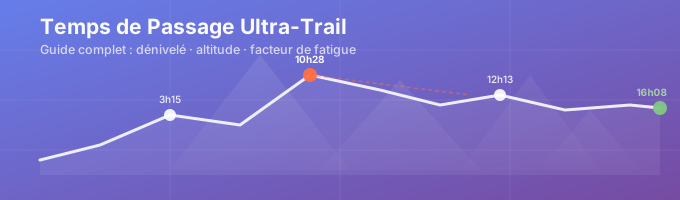
Here’s a fictional but realistic scenario: an intermediate-level runner aiming for an 18-hour finish on a 100 km race with 5,500 m of elevation gain. Fatigue factor set at 15%. The course is divided into 6 segments aligned with the official aid stations:
| Segment | Km | Elevation Gain | Progression Factor | Segment Time | Estimated Passing Time |
|---|---|---|---|---|---|
| Start → Aid Station 1 | 18 | 850 m | 38% | 3h15 | 3h15 |
| Refreshment Station 1 → Pass | 14 | 920 m | 32% | 2:48 | 6:03 |
| Pass → Refreshment Station 2 | 16 | 120 m | 78% | 1:55 | 7:58 |
| Refreshment Station 2 → Summit | 12 | 780 m | 35% | 2:30 | 10:28 |
| Summit → Refreshment Station 3 | 15 | 80 m | 82% | 1:45 | 12:13 |
| Refreshment Station 3 → Finish Line | 25 | 350 m | 65% | 3:55 | 4:08 p.m. (FF 15%) |
This table lets your support team know exactly what time to expect you at each aid station. If you arrive at Aid Station 2 25 minutes late, the message is clear. If you’re ahead of schedule on the first few segments, it’s better to pace yourself than to speed up.
Common Mistakes to Avoid in Your Race Plan
Even with a solid approach, these pitfalls consistently crop up during ultra-trail preparation.
- Starting too fast: this is the number one mistake. The excitement at the start masks fatigue. If you reach the halfway point 1 hour ahead of schedule, you’ll lose that time in the second half—often with interest.
- Underestimating nighttime fatigue: At night, everything slows down—reflexes, mental clarity, and morale. A plan that ignores the nighttime segment is an incomplete plan.
- Ignoring the impact of altitude: on a course with passes above 2,000 m, failing to adjust your pace for the altitude is like planning in a vacuum.
- Failing to allow for a margin on technical sections: a scree field or an exposed ridge can double your time over 2 km. These sections warrant a specific adjustment factor that you can fine-tune.
- Not sharing your plan with your support team: a plan kept to yourself is only useful to you. Your team needs your split times to be in the right place—and to know when to worry.
Calculating split times for ultra-trails is a discipline in itself. It requires honesty about your fitness level, precision in your calculations—and the right tools so you don’t spend hours on an Excel spreadsheet.
Upload your GPX file to segly.vo2run.app, set your fatigue factor, adjust segment by segment, and share your plan with your support team. It’s easy, takes just 10 minutes, and gives you priceless peace of mind during the race.